
Quick Answer
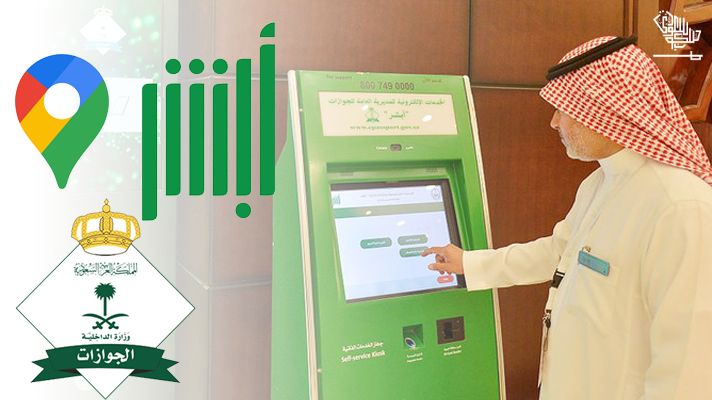
An Absher self-service kiosk is a touchscreen machine operated by the General Directorate of Passports (Jawazat) that lets you activate your Absher account, update your registered mobile number, and reset your password using your Iqama and fingerprint scan — no staff assistance needed.
Absher kiosks are found at Jawazat (Passport) offices, airports, hospitals, post offices, Mobily branches, and some bank branches across every major city in Saudi Arabia. Use the list below to find the nearest one to you.
Quick Facts
- What it is: A Jawazat-operated self-service touchscreen machine
- Three core services: Account activation, mobile number update, and password reset
- ID required: Iqama for expats or Saudi National ID for citizens
- Biometric required: Yes — fingerprint scan using right and left index fingers
- Mobile number needed: Yes — required to receive the OTP confirmation SMS
- Language: Arabic and English interface available
- Cost: Free to use
- Available hours: Depends on the location; Jawazat offices usually operate Sunday to Thursday from 7:30 AM to 2:30 PM
- Alternative methods: Bank apps such as Al Rajhi and SNB, or visiting a Jawazat branch
- Find locations: Through the Absher map on absher.sa or by searching “Absher kiosk” on Google Maps
What Is an Absher Kiosk Machine?
The Absher kiosk is a government self-service terminal deployed by Saudi Arabia’s General Directorate of Passports (Jawazat) across the Kingdom since 2015. It was introduced as part of Saudi Arabia’s digital transformation to reduce queues at government offices and give expatriates and citizens a fast, independent way to register and manage their Absher identity online.
As of 2026, over 20 million people in Saudi Arabia use Absher daily. The platform grants access to 280+ government e-services. However, before you can use any of those services, your account must be activated with biometric fingerprint verification. That activation cannot be done online or through the Absher app alone; it requires a physical verification step. That is exactly what the kiosk is for.
The machines have both Arabic and English interfaces, and most operations take under three minutes once you are at the machine.
What Can You Do at an Absher Kiosk?
The standard Absher self-service kiosk provides exactly three services:
1. Account Activation After registering your Absher account online at absher.sa, you must activate it via biometric fingerprint to unlock all 280+ government services. The kiosk is the fastest way to do this. You bring your Iqama, place your fingerprints on the scanner, enter your mobile number, and confirm the OTP. Your account is fully activated within minutes.
2. Mobile Number Update If your registered mobile number has changed or is no longer active, the kiosk lets you update it with a new one using fingerprint verification. This is critical because all Absher services rely on OTP authentication to your registered number.
3. Password Reset If you have forgotten your Absher password and cannot reset it online (because your registered mobile number is inactive or inaccessible), the kiosk verifies your identity via fingerprint and lets you set a new password on the spot.
Important: The kiosk does NOT process Iqama renewals, visa applications, or payment transactions. Those require the full Absher app or portal after your account is activated.
Step-by-Step: How to Use an Absher Kiosk Machine
Before You Go
Make sure you have:
- Your valid Iqama (for expats) or Saudi National ID (for citizens)
- Your active Saudi mobile number (to receive the OTP during activation)
- Your Absher username if resetting a password
At the Machine
- Tap the screen to wake the machine
- Select your language (Arabic or English) from the home screen
- Choose your service:
- “Activate Account”
- “Update Mobile Number”
- “Reset Password”
- Enter your Iqama number (10 digits) using the touchscreen keypad
- Place your right index finger on the fingerprint reader and hold until the scan completes
- Place your left index finger on the fingerprint reader and hold until the scan completes
- Enter your mobile number (the number you want linked to your account)
- Enter the OTP received by SMS on that mobile number
- Confirmation message appears. Your service is now complete.
For a password reset, the process is similar, but it also requires you to enter and confirm a new password before final submission.
Absher Kiosk Locations: City-by-City Complete List
Absher Kiosk Locations in Riyadh
Kiosks are available at the following locations in Riyadh and the surrounding areas:
Riyadh City
- Riyadh Passport Office (Main Jawazat headquarters)
- Passport Office, General Authority of Investment
- Passport Office, 2nd Industrial Area
- King Khalid International Airport (KKIA) terminals
- Saudi Post offices (selected branches)
- Mobily branches (selected locations in major malls)
Riyadh Region
- Deriyah (Diriyah) Passport Office
- Al Kharj Passport Office
- Guwaiyah Passport Office
- Dawadmi Passport Office
- Afif Passport Office
- Wadi el-Dawaser Passport Office
- Shaqraa Passport Office
- Zulfi Passport Office
- Aflaj Passport Office
- Hutat Bani Tamim Passport Office
- Huraimlaa Passport Office
- Muzahmiya Passport Office
- Majma’a Passport Office
- Sajer Passport Office
- Hutat Sedair Passport Office
- Artawiyah Passport Office
- Al Ghat Passport Office
- Thadeq Passport Office
- Rowaidah Passport Office
- Rumah Passport Office
Absher Kiosk Locations in Jeddah
Jeddah City
- Jeddah Passport Office (Main Jawazat branch)
- Investment General Authority Passport Office, Jeddah
- Saudi Airlines Passport Office, Jeddah
- King Abdulaziz International Airport (KAIA) terminals
- Mobily, Al Khaldiyah, Prince Sultan Street
- Saudi Post selected branches
Jeddah Region
- Rabigh Passport Office
- Khulais Passport Office (Mobily: Al-Madaris Street)
Absher Kiosk Locations in Makkah
- Makkah Passport Office (Main Jawazat branch)
- Mobily, Hajj Street (in front of NCB)
- Mobily, Al-Mansour Street, Al-Anakah Shopping Complex
- Qunfudah Passport Office
- Mobily, Qunfutha, 30th Street, Al Khaldia District
- Khurma Passport Office
- Ranya Passport Office
- Mobily, Rania, Main Street, Rania Mall
- Turba Passport Office
- Mobily, Turubah, Main Street, social security building
Absher Kiosk Locations in Madinah
- Al Madinah Passport Office (Main Jawazat branch)
- Investment General Authority Passport Office, Madinah
- Prince Mohammed bin Abdulaziz Airport (MED) terminals
- Mobily, Al-Bahar District, Rawadi Qoba Mall, Prince Abdul Majed Road
- Mobily, Prince Mohammed Bin Abdul Aziz Street
- Mobily, Al-Saba’a Masajed Street (Telecom Market)
- Al Ula Passport Office
- Al Mahd Passport Office
Absher Kiosk Locations in Yanbu
- Yanbu Passport Office
- Mobily, King Abdul Aziz Street
- Mobily, Ali Bin Abi Talib Street, Al Sharbatli District
Absher Kiosk Locations in Dammam
- Dammam Passport Office (Main Jawazat branch Eastern Region)
- King Fahd International Airport (KFIA) terminals
- King Fahad Specialist Hospital, Dammam
- Saudi Post selected branches
- Mobily selected branches
Absher Kiosk Locations in Al Khobar
- Al Khobar Passport Office
- Selected bank branches in the Al Khobar commercial district
- Mobily selected branches, Al Khobar
Absher Kiosk Locations in Jubail
- Al Jubail Passport Office
- Dahran Aramco Passport Office
Absher Kiosk Locations in Al Ahsa
- Al Ahsa (Hofuf) Passport Office
- Selected Mobily branches, Hofuf
Absher Kiosk Locations in Taif
- Taif Passport Office
- Selected Mobily branches in Taif
- Taif Regional Airport (selected times)
Absher Kiosk Locations in Jizan
- Jizan Passport Office
- Mobily, Rawda District, Saudi Arabian Airlines Street
- Ahad Masarha Mobily, City Center
- Damad Mobily, Main Street, near Damad supermarket
Absher Kiosk Locations in Other Cities and Regions
Hafr el-Batin: Hafr el-Batin Passport Office
Abha / Aseer Region: Abha Passport Office; selected Mobily branches in Abha
Najran: Najran Passport Office
Tabuk: Tabuk Passport Office; Tabuk Airport terminals
Hail: Hail Passport Office; Hail Airport
Qassim (Buraydah): Qassim Passport Office; Prince Naif bin Abdul Aziz Airport
Al Jouf (Sakaka): Al Jouf Passport Office
Northern Borders (Arar): Northern Borders Passport Office; Arar Airport
All major Jawazat (Passport) offices across Saudi Arabia have at least one Absher kiosk. Use the interactive map on absher.sa or Google Maps to search for “Absher machine” or “Absher kiosk” in your city to find the nearest available machine and its current operating hours.
How to Find the Absher Kiosk Nearest to You Right Now
Method 1: The Absher Official Website
- Go to absher.sa
- Log in or select the kiosk location finder option on the homepage
- The map shows all registered kiosk locations with addresses and operating hours
- Click on any marker to view the exact address
Method 2: Google Maps
- Open Google Maps on your phone
- Search: “Absher kiosk” or “Absher machine” or “جهاز أبشر”
- Filter by distance to find the closest location to you
- Tap for directions, hours, and user reviews
Method 3: Call Jawazat
Call the General Directorate of Passports on 920001212 and ask the operator for the nearest kiosk to your address. The phone line is staffed during government working hours (Sunday to Thursday, 7:30 AM to 2:30 PM).
When You Cannot Visit a Kiosk: Alternative Activation Methods
If you cannot travel to a kiosk (due to health, location, distance, or schedule), there are two other ways to activate your Absher account or update your mobile number:
Option 1: Activate via Your Bank App or Online Banking
Most major Saudi banks allow Absher activation directly in their apps or internet banking portals. This is often faster than visiting a kiosk. Supported banks include:
- Al Rajhi Bank (app and online banking)
- Saudi National Bank (SNB)
- Riyad Bank
- Bank Albilad
- Banque Saudi Fransi
- Saudi Investment Bank
- Alinma Bank
General steps for bank activation:
- Log in to your bank’s app or online banking portal
- Look for “Government Services” or “MOI / Absher Activation”
- Enter your Iqama number and confirm your personal details
- Confirm the activation request
- Receive an SMS confirmation
- Log in to Absher to complete the process
For a full step-by-step walkthrough of activation via Al Rajhi Bank, see our Absher Registration via Al Rajhi Bank guide.
Option 2: Visit a Jawazat Branch In Person
If biometric issues prevent kiosk completion (e.g., damaged fingerprints, physical disability), visit your nearest Jawazat (Passport) office directly. Bring your Iqama and username. A Jawazat officer can complete the activation manually.
Option 3: Portable Absher Device
Some institutions (including universities and hospitals) have portable Absher activation devices that work identically to kiosks. These are available for residents with limited mobility or who cannot reach a standard kiosk. Contact your institution’s government affairs office to request use of a portable device.
Why You Need an Activated Absher Account: 280+ Services
Activating your Absher account unlocks a comprehensive range of government services. The most important ones for expats and residents include:
Residency and Immigration
- Iqama renewal and status check
- Exit and re-entry visa issuance and cancellation
- Final exit visa processing
- Dependent visa management (family members and domestic workers)
- Transfer of sponsorship (Kafala transfer)
Traffic and Vehicles
- Traffic violation inquiry and payment
- Vehicle registration renewal (Istimara)
- Driving license renewal
- Accident report inquiry
Civil Affairs
- National address registration (now mandatory for many services)
- Digital ID documents (legally valid copies of Iqama, ID, vehicle registration, and driving license)
Passport Services
- Passport renewal inquiry
- Family visa application and extension
- Muqeem visa check
Domestic Workers
- Musaned platform integration (hiring, salary transfer, contract management)
- Authorization to receive domestic workers at airports
Other Services
- Hajj and Umrah permit applications
- Civil status inquiries
- Criminal record status check
- Absher Business Services (for employers and sponsors)
Troubleshooting: Common Kiosk Problems and Solutions
Fingerprint not recognized: Ensure your fingers are clean and dry. Try pressing more firmly. If fingerprints are damaged (e.g., by cuts, burns, or skin conditions), the machine may not read them reliably. In this case, visit a Jawazat branch for manual assistance.
OTP not received: Confirm your mobile number is active and has a signal. If the number is not active, you cannot complete kiosk activation. Activate a new Saudi SIM card first, then retry. If your old SIM is deactivated, you need to update your number, which also requires a valid OTP, creating a catch. In this case, contact Jawazat at 920001212 for guidance.
“Iqama number not found” error: This can happen if your Iqama was recently renewed and the system has not synced. Try again after 24 hours. If it persists, visit your Jawazat branch.
Machine screen is frozen or blank: Tap gently or wait 30 seconds. If there is no response, the machine may be out of service. Try a different kiosk at the same location or visit the nearest alternative branch.
Account shows as “already activated”: If activation seems blocked because the system says your account is already active, but you cannot log in, the issue is your password or mobile number. Use the kiosk to reset your password or update your mobile number.
Absher Kiosk vs Bank Activation vs Jawazat Branch: Which Is Best for You?
| Your Situation | Best Method |
|---|---|
| New expat, first Absher activation | Online reset at Absher.sa (no visit needed) |
| Good smartphone, bank account in KSA | Bank app activation (no travel needed) |
| Changed phone number, old number inactive | Kiosk (fingerprint verifies identity without OTP) |
| Forgot password, have active mobile | Ask for a portable Absher device |
| Forgot password, mobile also inactive | Kiosk with fingerprint (only option) |
| Damaged fingerprints or physical disability | Jawazat branch in person |
| Forgot password, have an active mobile | Located at a university or hospital campus |
Frequently Asked Questions
Absher kiosks are located at all major Jawazat (Passport) offices, King Khalid International Airport in Riyadh, King Abdulaziz International Airport in Jeddah, King Fahd International Airport in Dammam, Prince Mohammed bin Abdulaziz Airport in Madinah, and at many hospitals, Mobily branches, and Saudi Post offices across every city. Search “Absher kiosk” on Google Maps or check the location finder on absher.sa.
Exactly three things: activate your Absher account using fingerprint biometrics, update your registered mobile number, and reset a forgotten password. The kiosk does not process Iqama renewals, visas, or payments.
Yes. You can activate through your bank’s app or online banking portal (Al Rajhi, SNB, Riyad Bank, and others). You can also visit a Jawazat branch to have it activated manually. The bank app method is the most convenient if you have an active Saudi bank account.
Yes. You must present your Iqama number and provide a biometric fingerprint scan at the machine. Citizens use their Saudi National ID instead of an Iqama.
Yes. The kiosk is designed for all residents of Saudi Arabia, including expatriate workers, family visitors, and dependents who have an Iqama.
Yes. You must present your Iqama number and provide a biometric fingerprint scan at the machine. Citizens use their Saudi National ID instead of an Iqama.
Yes. The kiosk is designed for all residents of Saudi Arabia, including expatriate workers, family visitors, and dependents who have an Iqama.
No. The Absher kiosk service is completely free.
Kiosks at Jawazat offices are typically available from 7:30 AM to 2:30 PM, Sunday through Thursday (government working hours). Kiosks at airports, hospitals, and Mobily branches may have extended hours. Confirm with the specific location before visiting.
Yes. The kiosk uses fingerprint verification to confirm your identity, so you do not need access to your old registered number to update it. This is the main advantage of the kiosk for people whose old mobile number is no longer active.
Conclusion
The Absher self-service kiosk is the fastest and most reliable way to activate a new Absher account or update your mobile number in Saudi Arabia, especially for expats who do not yet have a Saudi bank account. Machines are available at every Jawazat office across the Kingdom, at all major airports, and at many hospitals and Mobily branches.
For most situations, finding the nearest Jawazat office will solve your Absher kiosk needs immediately. Use Google Maps, the absher.sa location tool, or call 920001212 to confirm the nearest machine with current operating hours before you travel.
Once activated, your Absher account gives you access to 280+ government services without needing to visit any government office again.
Related guides on Saudi Scoop:
- How to Create and Activate an Absher Account for the full registration process
- Absher Registration via Al Rajhi Bank to activate without visiting a kiosk
- Saudi Visa Validity Check Online 2026: What to do once your account is active
DISCLAIMER: Kiosk locations, operating hours, and available services are subject to change by the General Directorate of Passports. Saudi Scoop is not affiliated with the Saudi Government or Jawazat. Always verify current kiosk availability at absher.sa or by calling 920001212 before visiting.

Anum is a passionate writer with a love for storytelling and creativity. With a keen interest in exploring various topics, she crafts engaging content that resonates with her readers.